4.1
DOM manipulation
Examples with a Run button are editable. Underlined terms open a short definition.
DOM Manipulation
Document Object Model Structured Representation Of Html Documents. Allows Javascript To Access Html Elements And Styles To Manipulate Them.
DOM tree Structure
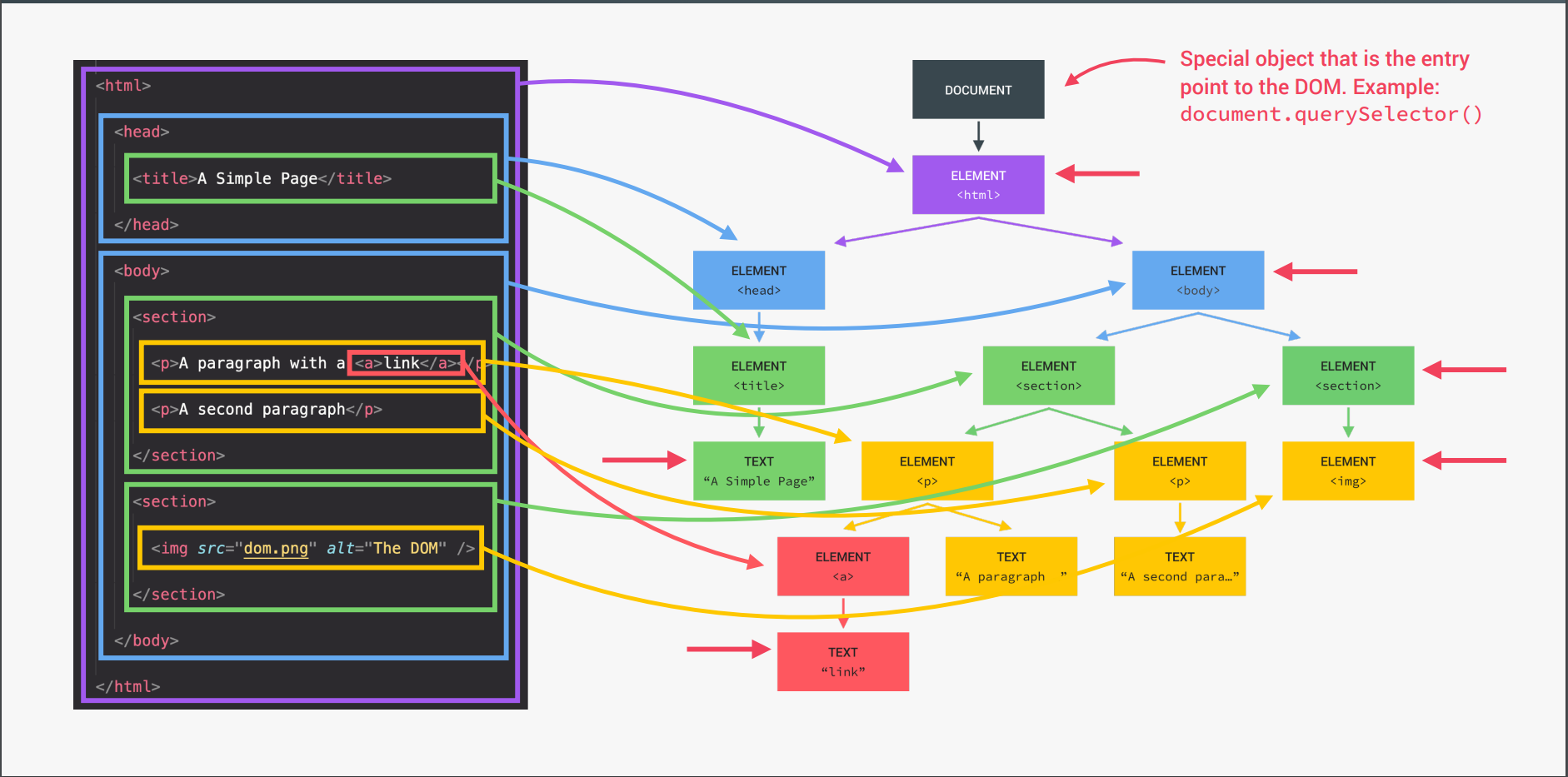 DOM is not Part of JavaScript …
Javscript interact with DOM by WEB API’s that browser Implements …
- Accessing Dom Elements
- Grab Children/Parent Node(s)
- Create New DOM Elements
- Add Elements to the DOM
- Remove Html Element
- Add/Remove/Toggle/Check Classes
- Updating Styles Using Dom
- Changing the Atributes
Accessing Dom Elements
// Returns a reference to the element by its ID.
document.getElementById('someid');

// Returns an array-like object of all child elements which have all of the given class names.
document.getElementsByClassName('someclass');

// Returns an HTMLCollection of elements with the given tag name.
document.getElementsByTagName('LI');

// Returns the first element within the document that matches the specified group of selectors.
document.querySelector('.someclass');

// Returns a list of the elements within the document (using depth-first pre-order traversal of the document's nodes)
// that match the specified group of selectors.
document.querySelectorAll('div.note, div.alert');
Dom traversing
const h1 = document.querySelector('h1');Going DOWNWARDS : CHILD
// return list of node with class ".highlight"
console.log(h1.querySelectorAll('.highlight'));
// reurns list of all the child node -> text,comment,element,etc.
console.log(h1.childNodes);
// returns the html collection of element
console.log(h1.children);
Going UPWARADS : PARENT
h1.closest('.header'); // returns the closet parent element -> can go as high it can go

console.log(h1.parentNode);
console.log(h1.parentElement);

// parentElement it is the same as parentNode. The only difference comes when a node's parentNode is not an element. If so, parentElement is null.

document.body.parentNode; // the <html> element
document.body.parentElement; // the <html> element

document.documentElement.parentNode; // the document node
document.documentElement.parentElement; // null

document.documentElement.parentNode === document; // true
document.documentElement.parentElement === document; // false
Since the <html> element (document.documentElement) doesn’t have a parent that is an element, parentElement is null. (There are other, more unlikely, cases where parentElement could be null, but you’ll probably never come across them.)
source StackOverflow
// Going SIDEWAY : Siblings
console.log(h1.previousElementSibling); // element before h1
console.log(h1.nextElementSibling); // element after

console.log(h1.previousSibling); // previos node
console.log(h1.nextSibling);

console.log(h1.parentElement.children); // all siblings
Create New DOM Elements
// create new elments
var newHeading = document.createElement('h1');
var newParagraph = document.createElement('p');

// create text nodes for new elements
var h1Text = document.createTextNode('This is a nice header text!');
var pText = document.createTextNode('This is a nice paragraph text!');

// attach new text nodes to new elements
newHeading.appendChild(h1Text);
newParagraph.appendChild(pText);

// elements are now created and ready to be added to the DOM.
Add Elements to the DOM
// grab element on page you want to add stuff to
var firstHeading = document.getElementById('firstHeading');

// add both new elements to the page as children to the element we stored in firstHeading.
firstHeading.appendChild(newHeading);
firstHeading.appendChild(newParagraph);

// can also insert before like so

// get parent node of firstHeading
var parent = firstHeading.parentNode;

// insert newHeading before FirstHeading
parent.insertBefore(newHeading, firstHeading);

// directly add before and after
const header = document.querySelector('.header');
header.after(message);
header.before(message);
Suppose you have the following HTML:
<div id="box1">
    <p>Some example text</p>
</div>
<div id="box2">
    <p>Some example text</p>
</div>
You can insert another snippet of HTML between #box1 and #box2:
var box2 = document.getElementById('box2');
box2.insertAdjacentHTML('beforebegin', '<div><p>This gets inserted.</p></div>');

// beforebegin - The HTML would be placed immediately before the element, as a sibling.
// afterbegin - The HTML would be placed inside the element, before its first child.
// beforeend - The HTML would be placed inside the element, after its last child.
// afterend - The HTML would be placed immediately after the element, as a sibling.
Add Multiple Element
const header = document.querySelector('.header');
const message = document.createElement('div');
message.classList.add('cookie-message');
message.innerHTML =
    'We use cookied for imporoved functionallity and analytics. <button class="btn btn-close-cookie"> Got it!</button>';

header.prepend(message); // append as a first child
// header.append(message); // just change the place from first child to last child not gonna duplicate it again
header.append(message.cloneNode(true)); // .clonenode(true) give perms to duplicate the element
Remove Html Element
.remove to remove the element
const message = document.createElement('div');
document.querySelector('.btn--close-cookie').addEventListener('click', () => {
    message.remove(); // easy Way
    message.parentElement.removeChild(message); // Old way to remove
});
Add/Remove/Toggle/Check Classes
// grab element on page you want to use
var firstHeading = document.getElementById('firstHeading');

// will remove foo if it is a class of firstHeading
firstHeading.classList.remove('foo');

// will add the class 'anotherClass' if one does not already exist
firstHeading.classList.add('anotherclass');

// add or remove multiple classes
firstHeading.classList.add('foo', 'bar');
firstHeading.classList.remove('foo', 'bar');

// if visible class is set remove it, otherwise add it
firstHeading.classList.toggle('visible');

// will return true if it has class of 'foo' or false if it does not
firstHeading.classList.contains('foo');

// Don't use -> remove all classes and you can only add one class
logo.className = 'Chandraprakash';
Updating Styles Using Dom
Change Any Style
// To add styles .style.PROPERTY
message.style.backgroundColor = '#37383d';
// Property name should be in Camel Case
message.style.width = '100%';
Access the property
console.log(message.style.height); // You can't read any property. You can only read inline style
console.log(message.style.backgroundColor); // rgb(55, 56, 61)

console.log(getComputedStyle(message)); // get the Object of styles
console.log(getComputedStyle(message).color); // To access specific style
// these values are computed by browser not necceserly decalared by developer
Change the Property
message.style.height = getComputedStyle(message).height + 48 + 'px'; // Not Gonna work beacuse compluted height will be in 40px you can't add with number so need to parse
message.style.height =
    Number.parseFloat(getComputedStyle(message).height) + 40 + 'px';
Change CSS variable
document.documentElement.style.setProperty('--color-primary', 'orangered');Changing the Atributes
Atributes - standard
const logo = document.querySelector('.nav__logo');
console.log(logo.alt); // Bankist logo
console.log(logo.className); // nav__logo
console.log(logo.src); // http://127.0.0.1:5500/img/logo.png // relative folder // for exact use get atribute

// Changing Atributes
logo.alt = 'Befutiful minimlist Log';
Atributes - Non-Standard
<img
    src="img/logo.png"
    alt="Bankist logo"
    class="nav__logo"
    id="logo"
    designer="Chandraprakash"
    data-version-number="3.0"
/>console.log(logo.designer); // undefined - Not gonna work
console.log(logo.getAttribute('designer')); // "Chandraprakash"
console.log(logo.getAttribute('src')); // img/logo.png
logo.setAttribute('company', 'Bankist');Data Atributes
console.log(logo.dataset.versionNumber); // 3.0Events in DOM
Events are fired are Fired from user Interaction. These can arise from user interactions such as using a mouse or resizing a window, changes in the state of the underlying environment (e.g. low battery or media events from the operating system), and other causes.
For Event List MDN DOCS
const h1 = document.querySelector('h1');
const hero = document.querySelector('.header__img');

const h1MouseEnter = e => {
    hero.style.transform = 'translateX(-40rem)';
};
// Simple Event listner
h1.addEventListener('mouseenter', h1MouseEnter);

setTimeout(() => h1.removeEventListener('mouseenter', h1MouseEnter), 3000); // remvoves the event

// old School way -> can't add multiple event listen on same activity
// can't remove event listner
h1.onmouseleave = e => {
    hero.style.transform = 'translateX(0)';
};
Explore the idea
Click the inner button. Its event bubbles to the surrounding panel.
Illustrative model. The controls step through the behavior described above.Your last opened chapter is saved in this browser when local storage is available.
Discuss this section
Questions, corrections or a better example? Comments use GitHub Discussions.