5.1
Object-oriented programming
Examples with a Run button are editable. Underlined terms open a short definition.
OOPS
- 👉 Object-oriented programming (OOP) is a programming paradigm based on the concept of objects;
- 👉 We use objects to model (describe) real-world or abstract features;
- 👉 Objects may contain data (properties) and code (methods). By using objects, we pack data and the corresponding behavior into one block;
- 👉 In OOP, objects are self-contained pieces/blocks of code;
- 👉 Objects are building blocks of applications, and interact with one another;
- 👉 Interactions happen through a public interface (API): methods that the code outside of the object can access and use to communicate with the object;
- 👉 OOP was developed with the goal of organizing code, to make it more flexible and easier to maintain (avoid “spaghetti code”).
Class
Like a blueprint from which we can create new objects.
Suppose there is Class of User that contain peoperties of user like username, password, email.
You can use the class to create new user Object on yhe bases of the class without write every time same code and method for each user. That Object is know as Instance. You can create as many.
THE 4 FUNDAMENTAL OOP PRINCIPLES
Abstraction
Ignoring or hiding details that don’t matter, allowing us to get an overview perspective of the thing we’re implementing, instead of messing with details that don’t really matter to our implementation.
Encapsulation
Keeping properties and methods private inside the class, so they are not accessible from outside the class. Some methods can be exposed as a public interface (API).
Inheritance
Making all properties and methods of a certain class available to a child class, forming a hierarchical relationship between classes. This allows us to reuse common logic and to model real-world relationships.
Polymorphism
A child class can overwrite a method it inherited from a parent class [it’s more complex that that, but enough for our purposes].
Prototypal inheritance
- 👉 Objects are linked to a prototype object;
- 👉 Prototypal inheritance: The prototype contains methods (behavior) that are accessible to all objects linked to that prototype;
- 👉 Behavior is delegated to the linked prototype object
3 WAYS OF IMPLEMENTING PROTOTYPAL INHERITANCE IN JAVASCRIPT
- Constructor functions
- 👉 Technique to create objects from a function;
- 👉 This is how built-in objects like Arrays, Maps or Sets are actually implemented.
- Constructor Function
- ES6 Classes
- 👉 Modern alternative to constructor function syntax;
- 👉 “Syntactic sugar”: behind the scenes, ES6 classes work exactly like constructor functions;
- 👉 ES6 classes do NOT behave like classes in “classical OOP” (last lecture).
- ES2015 Classes
- Object.create()
- 👉 The easiest and most straightforward way of linking an object to a prototype object.
Constructor Function
const Person = function (firstName, birthyear) {
    // Instance property
    this.firstName = firstName;
    this.birthyear = birthyear;

    // Never do this for writing methods -> this gonna make function copy to all instance -> this will add multiple copies to all the Objects
    //  you can do prototype inherritence
    // this.calcAge = function () {
    //   console.log(2037 - this.birthyear);
    // };
};

const Chandraprakash = new Person('Chandraprakash', 2002);
console.log(Chandraprakash); // Person {firstname: 'Chandraprakash', birthyear: 2002}

// 1. New {} is Created
// 2. Function  is called, this = {}
// 3. {} linked to prototype
// 4. Function actomatically returned {}

const jonas = new Person('Jonas', 1991);
console.log(jonas); // Person {firstname: 'Jonas', birthyear: 1991}

console.log(Chandraprakash instanceof Person); // true
Prototypes
Person.prototype.calcAge = function () {
    console.log(2037 - this.birthyear);
};
console.log(Person.prototype); // {calcAge: ƒ, constructor: ƒ}

jonas.calcAge(); // 46
Chandraprakash.calcAge(); // 35
console.log(Chandraprakash); // Person {firstName: 'Chandraprakash', birthyear: 2002}

console.log(jonas.__proto__ === Person.prototype); // true
// Person.prototype is not the prototype of person it is the prototype tha gonna used for object creted by that Constructre

console.log(Person.prototype.isPrototypeOf(jonas)); //true
console.log(Person.prototype.isPrototypeOf(Chandraprakash)); // true
console.log(Person.prototype.isPrototypeOf(Person)); // false
// Person is not the prototype of Person it is only of Instance

Person.prototype.species = 'Homo Sapiens';
console.log(Chandraprakash.species); // Homo Sapiens

console.log(jonas.hasOwnProperty('firstName')); // true -> Declared property is only its property
console.log(jonas.hasOwnProperty('species')); // false -> Inherited properties are not there actial property
THE PROTOTYPE CHAIN
const Person = function (firstName, birthyear) {
    // Instance property
    this.firstName = firstName;
    this.birthyear = birthyear;
};
Person.prototype.calcAge = function () {
    console.log(2037 - this.birthyear);
};

Person.prototype.species = 'Homo Sapiens';
console.log(ChandraPrakah.hasOwnProperty('species')); // false
In Above code block we declare a small class named Person.
In this class we had to Prototype properties calcAge and species only.
ChandraPrakah.hasOwnProperty('species')
In above line we just checking for does species name properties is there in Chandraprakash.
It returns flase Because there is no such property of ChandraPrakash Object.
You had noticed that we not have any such property name .hasOwnProperty in ChandraPrakash Object, then how it Works ?
It Actually woks By the Prototype Chain, But What is this?
In Prototype chain when JS engine not find any method in prototype then it checks the prototype of Object Class.
Prototype is actually a Object having there own methods.
It checks till the it prototype is null.
let’s Understand by the Code Block
const h1 = document.querySelector('h1');
console.dir(h1);
/*
{
    accessKey: ""
    align: ""
    ...
    ...
    [[Prototype]]: HTMLHeadingElement
}
*/
H1 element has prototype of HTMLHeadingElemt Lets go deep
console.dir(h1.__proto__);
/*
{
    align: (...)
    constructor: ƒ HTMLHeadingElement()
    Symbol(Symbol.toStringTag): "HTMLHeadingElement"
    ...
    ...
    [[Prototype]]: HTMLElement
}
*/
Inside HTMLHeadingElemt there is constructor method and the end there is prototype of HTMLElement
Lets dive more in
console.dir(h1.__proto__.__proto__);
/*
{
    ...
    ...
    [[Prototype]]: Element
}
*/
HTMLElement is consist of Element prototype
This is Whole Prototype Chain of h1 Element
h1 > HTMLHeadingElement > HTMLElement > Element > Node > EventTarget > Object > null
ES2015 Classes
// 1. Class Expresion
const PersonClExp = class {};

// 2. Class Declartion
class Person {
    constructor(firstName, birthyear) {
        // Instance property
        this.firstName = firstName;
        this.birthyear = birthyear;
    }

    // Method will added to .prototype property
    calcAge = function () {
        console.log(2037 - this.birthyear);
    };

    greet() {
        console.log(`Hey ${this.firstName}`);
    }
}

const jessica = new Person('Jessica', 1996);

// 1. Classes are not hoisted
// 2. Class are first-class citizen
// 3. Classes are executed in strict mode
Getters and Setters
Getter and Setter for Objects
const account = {
    owner: 'Jonas',
    movements: [23, 35, 46, 547, 687, 800, 43, 532, 34, 23],

    get latest() {
        return this.movements.slice(-1).pop();
    },
    set newMov(mov) {
        // Always need one argument
        this.movements.push(mov);
    },
};

// Getter -> without calling the funtion get the value
console.log(account.latest);

// Setter -> Using setter directly set the value
account.newMov = 3100;
console.log(account.movements);
Getter, Setter and Static method for Classes
class Person {
    constructor(fullName, birthyear) {
        // Instance property
        this.fullName = fullName;
        this.birthyear = birthyear;
    }

    // Method will added to .prototype property
    calcAge() {
        console.log(2037 - this.birthyear);
    }

    greet() {
        console.log(`Hey ${this.firstName}`);
    }

    get age() {
        return 2037 - this.birthyear;
    }
    // Set a property that already exist
    set fullName(name) {
        if (name.includes(' ')) this._fullName = name;
        else console.log(`${name} is not full name`);
    }

    get fullName() {
        return this._fullName;
    }
    // Static Methods -> Not accesible by Object only Used on Person Constructor
    static hey() {
        console.log('Hey there 👋');
        console.log(this);
    }
}

const jessica = new Person('Jessic aDAv', 1996);

console.log(jessica.fullName);
// console.log(jessica.age); // 41

const walter = new Person('walter', 1332);
Object.create()
// First declared Object of prototype methods
const PersonProto = {
    calceAge() {
        console.log(2037 - this.birthYear);
    },
};
// Then Creating the Empty Object
const steven = Object.create(PersonProto);
console.log(steven); // {}
// Adding Data
steven.name = 'Steven';
steven.birthYear = 2002;
steven.calceAge(); // 35
console.log(steven); // {name: 'Steven', birthYear: 2002}
InHertience between Classes
- Using Function constructor
// Person
const Person = function (firstName, birthyear) {
    this.firstName = firstName;
    this.birthyear = birthyear;
};

Person.prototype.calcAge = function () {
    console.log(2037 - this.birthyear);
};

// Student
const Student = function (firstName, birthYear, course) {
    Person.call(this, firstName, birthYear); // Calling the person class by giving the manually this keyword.
    this.course = course;
};

// Linking Prototype of Person to student
Student.prototype = Object.create(Person.prototype);
// Set the constructor because the Object.create set it to perosn
Student.prototype.constructor = Student;

Student.prototype.introduce = function () {
    console.log(`My name is ${this.firstName} and I study ${this.course}`);
};

const mike = new Student('Mike', 2020, 'Computer Science');
console.log(mike);
mike.introduce();
mike.calcAge(); // No we Able to access method of Person
console.dir(Student.prototype.constructor);- Using ES2015 classes
class Person {
    constructor(firstName, birthyear) {
        this.firstName = firstName;
        this.birthyear = birthyear;
    }
    get age() {
        return 2037 - this.birthyear;
    }
}

// extends directly connect child class with parent class
class Student extends Person {
    constructor(firstName, birthyear, course) {
        // Needs to Happen First
        super(firstName, birthyear);
        this.course = course;
    }
    introduce() {
        console.log(`My name is ${this.firstName} and I study ${this.course}`);
    }
    // Overrided Parent method
    get age() {
        return 2022 - this.birthyear;
    }
}

const dave = new Student('jay Dave', 2003, 'Computer Science');
console.log(dave);
dave.introduce();
console.log(dave.age);
Encapsulation
Encapsulation is make methods and properties protected
Below is Account class, It has some Properties and methods
class Account {
    constructor(owner, currency, pin) {
        this.owner = owner;
        this.currency = currency;
        this.pin = pin; // this should not be accessible
        this.movements = []; // this should not be accessible
        this.locale = navigator.language;

        console.log(`Thanks ${this.owner} for Opening Account`);
    }
    // Public interface
    deposit(amount) {
        this.movements.push(amount);
    }
    withdraw(amount) {
        this.deposit(-amount);
    }
    aproveLoan() {
        return true; // this should not be accessible
    }
    requestLoad(amount) {
        if (this.aproveLoan) {
            this.deposit(amount);
            console.log('Loan Approved');
        }
    }
}
const acc1 = new Account('Chandraprakash', 'RUPEE', 111);
acc1.deposit(211);
acc1.withdraw(2211);
console.log(acc1);
console.log(acc1.pin);
Anyone can access the pin, movements and aproveLoan method that can be harmful.
lets do some encapsulation ----
- Protected But not Private
class Account {
    ....
    // Not truely private but Protected that you know not to mess with it. Still accesible
-    this.pin = pin;
-    this.movements = [];
+    this._pin = pin;
+    this._movements = [];

-  aproveLoan() {
+  _aproveLoan() {
    return true;
  }
  requestLoad(amount) {
-    if (this.aproveLoan) {
+    if (this._aproveLoan) {
      this.deposit(amount);
      console.log('Loan Approved');
    }
  }
}
- Truely private classes
These just a propasal to Implement not yet full in JS
// Public Feild -> Anyone can access
// Private Feild -> Not accessible outside the Class
// Public Method -> Anyone can access
// Private Method -> Not implemented in any browser yet

class Account {
    // Public Feild -> Static Public proprities put outside of constructor
    locale = navigator.language;

    // Private Field -> Add # before the properties name
    #movements = [];
    #pin; // -> the properties that are joing to assign by constructor then just declare it only

    constructor(owner, currency, pin) {
        this.owner = owner;
        this.currency = currency;
        this.pin = pin;
        console.log(`Thanks ${this.owner} for Opening Account`);
    }
    // Public Methods -> all method in constructor are Public
    get movements() {
        return this.#movements;
    }

    deposit(amount) {
        this.#movements.push(amount);
    }
    withdraw(amount) {
        this.deposit(-amount);
    }

    requestLoan(amount) {
        if (this.#aproveLoan) {
            this.deposit(amount);
            console.log('Loan Approved');
        }
    }
    // Private Methods -> don't Use not used in any Browser yet
    #aproveLoan() {
        return true;
    }
}
const acc1 = new Account('Chandraprakash', 'RUPEE', 111);
acc1.deposit(211);
acc1.withdraw(2211);
console.log(acc1);
console.log(acc1.requestLoan(300));
console.log(acc1.#aproveLoan(300));
// console.log(acc1.#pin);
// console.log(acc1.#movements);
//  Error when you try to access
// Uncaught SyntaxError: Private field '#movements' must be declared in an enclosing class
Chaining in Class methods
Return the this at end of every method the you can easily perform any task on it by chainning
class Account {
    constructor(owner, currency, pin) {
        this.owner = owner;
        this.pin = pin;
        this.currency = currency;
        this.locale = navigator.language;
        this.movements = [];
        console.log(`Thanks ${this.owner} for Opening Account`);
    }
    movements() {
        return this.movements;
    }
    deposit(amount) {
        this.movements.push(amount);
        return this;
    }
    withdraw(amount) {
        return this.deposit(-amount);
    }
    aproveLoan() {
        return true;
    }
    requestLoan(amount) {
        if (this.aproveLoan) {
            this.deposit(amount);
            console.log('Loan Approved');
        }
        return this;
    }
}
const acc1 = new Account('Chandraprakash', 'RUPEE', 111);
// Chaining
acc1.deposit(300).deposit(200).withdraw(400).requestLoan(30).withdraw(4000);
console.log(acc1.movements); // [300, 200, -400, 30, -4000]
Class in one Image
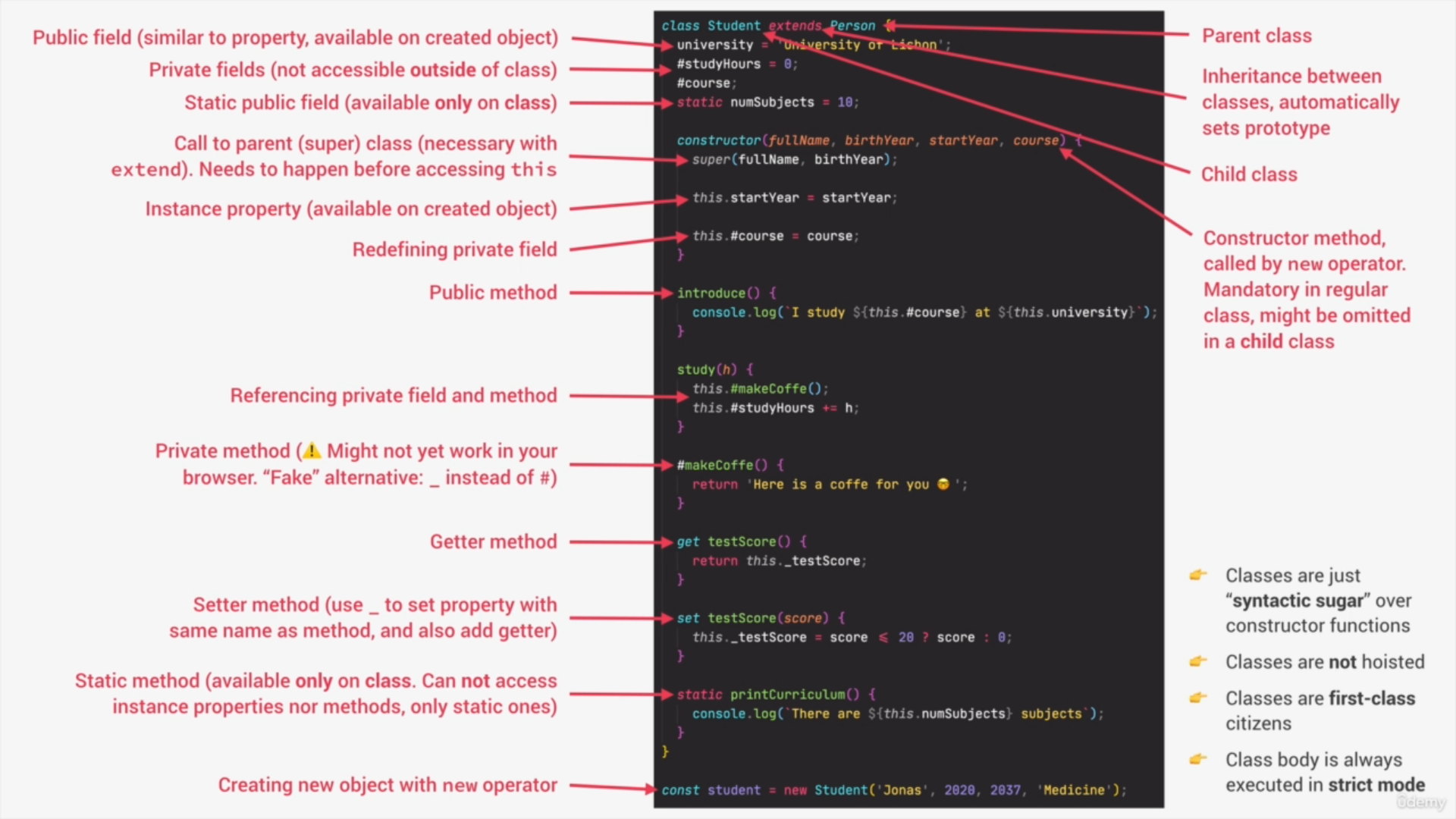
Image by Jonas Schmedtmann
Explore the idea
Property lookup checks the instance before the prototype.
Your last opened chapter is saved in this browser when local storage is available.
Discuss this section
Questions, corrections or a better example? Comments use GitHub Discussions.